Offline cycling maps
Offline cycling maps are part of ride preparation, especially when your route leaves familiar roads. Sort out the coverage before departure, while there is still time to check a missing download or plan a detour.
Available for iPhone
Why a working connection can disappear
Rural roads can pass through gaps in mobile coverage, and hills or valleys can block radio signals from a mast. The connection at the café does not tell you what reception will be like on the far side of the ridge. Treat the whole route as something to prepare, rather than assuming the signal at the start will continue.
Abroad, roaming settings and access to a local network can also affect whether mobile data is available. Check those arrangements before travelling. A familiar phone can still be in an unfamiliar network situation, even when the roads are busy and well signposted.
Your position and the map are different things
GPS positioning uses signals received from satellites; it does not require a mobile-data connection to calculate a position. Map imagery is separate data. To display it without an internet connection, the relevant map content needs to be stored on the phone already.
Satellite reception can still be affected by obstructions and the receiver’s surroundings. Offline maps do not remove that limitation. Seeing a position marker and seeing readable roads around it are two different checks, so make time for both before relying on your phone on an unfamiliar ride.
A region or the tiles for a route?
When comparing tools, read how to choose a cycling navigation app around route imports, map downloads and the checks you can make before riding.
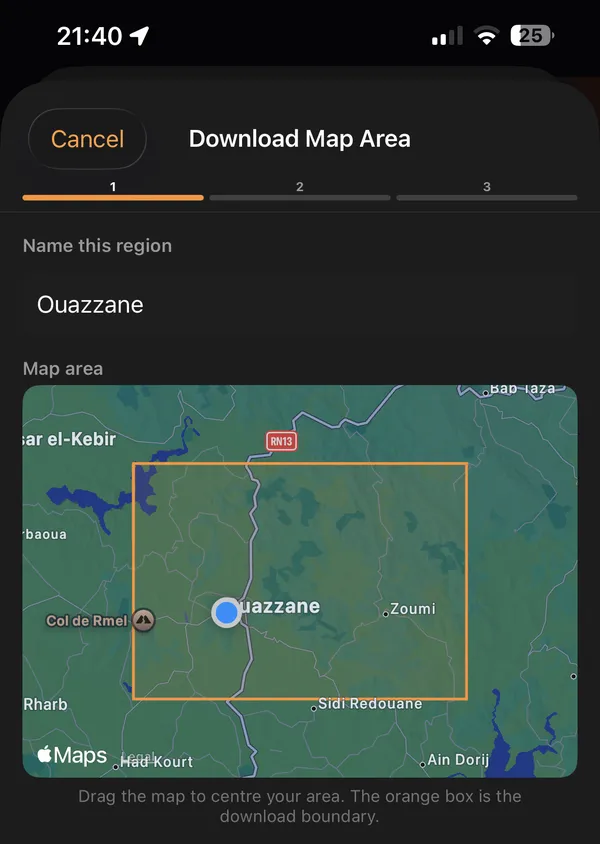
Glood lets you download a map region for riding offline.
For a planned route, download map tiles before you leave, then use the downloaded coverage and record your ride without a network connection.
A region is useful to consider when the day’s route is flexible: you may want to explore neighbouring roads or choose the return journey later. Tiles prepared around a planned route suit a day with a more definite line to follow. In either case, decide what area you will actually need rather than treating a completed download as coverage for every possible road.
If you are starting with a GPX route from a file or a link, distinguish the route data from its map background. Keep the route itself easy to find, then check the map around the places where you expect to ride.
A pre-ride check you can do at home
- Finish the map download while connected, rather than leaving it running as you head out.
- Inspect the start, finish and any alternative way home, including roads beyond the main line.
- Temporarily turn off mobile data and Wi-Fi to check the map you expect to use, then restore the connections you need.
- Review climbs on routes with elevation data when planning the time, effort and supplies for the day.
Leave room in the plan for a closed road or a change of mind. A download made for yesterday’s route deserves another check if you have moved the start or extended the ride. The useful question is whether the saved coverage matches today’s outing.
Plan for phone power as well as coverage
Lowering screen brightness can reduce battery use, although you still need to read the display comfortably. Avoid leaving brightness higher than the conditions require. Poor mobile reception can also affect battery life as a phone searches for a better connection; turning off cellular connections changes that behaviour, but also affects calls and messages.
Choose connection settings deliberately, and understand how you would contact someone if needed. For a long day, consider carrying a charged power bank and a cable you have tested with your phone. Keep charging kit protected from rain, and check that the cable reaches with the phone in the position you intend to use. Use the checklist for a cycling ride without signal to check maps, route and power together.
These are general phone preparations, not a battery-life estimate for any particular app. Start with the phone charged and make your first offline-map check on a familiar outing before depending on a new setup far from home.
Questions before your ride
Does it work with no signal?
Yes—Glood can use the map coverage you have downloaded and record the ride without a network connection.
Does GPS need mobile data?
No, the satellite receiver can calculate position without mobile data. Downloading background maps is a separate task, and satellite reception can still be obstructed by your surroundings.
Will downloading a route also download its map?
Not by itself: a GPX file and background map data are different things. Check that the map download is complete as well as checking that the route file is on your phone.